Is Your Code Burning Money? How to Cut Cloud Costs by 40% Without Touching Your Features
One of the most painful growing pains for any successful digital platform is the "Cloud Bill Shock." You scale from 1,000 to 100,000 users, and suddenly your AWS or Google Cloud invoice skyrockets — often faster than your revenue.
The common advice is to "reserve instances" or "buy savings plans." While those are good financial tactics, they mask the root problem.
As a Technical Lead, I have learned that the biggest source of cloud waste isn't the pricing model — it's the code itself. Inefficient software requires expensive hardware. By optimizing your backend architecture, you can often run the same workload on half the infrastructure.
1. Stop Paying for Idle CPU (The Node.js Trap)
Node.js is single-threaded. If you write synchronous code that blocks the Event Loop — like complex image processing or heavy JSON parsing — you freeze the server. To compensate, teams often upgrade to massive, expensive EC2 instances just to keep the application responsive.
The Fix: Refactor heavy computation out of the main server. Move these tasks to AWS Lambda or Google Cloud Functions.
The Savings: You stop paying for a giant 24/7 server just to handle occasional heavy tasks. With Serverless, you pay only for the milliseconds the code actually runs. For workloads with bursts of computation, this can reduce costs by 70-90% for those specific tasks.
2. The "Full Table Scan" Tax
Your database is likely the most expensive line item on your bill. If your queries are slow, your database server runs at 100% CPU, forcing you to upgrade to a higher tier.
The Fix: Aggressive Indexing and Query Analysis. Using tools like pg_stat_statements (for PostgreSQL) or the MongoDB Profiler, identify queries that are scanning the entire database.
The Savings: Adding a simple index can reduce a query's execution time from 2 seconds to 20 milliseconds. This often allows you to downgrade your database instance size by 50% without losing performance. One query. One index. Half the database bill.
3. Kill the "Zombie" Environments
In many development teams, "Dev," "QA," and "Staging" environments mirror production. These servers often run 24 hours a day, 7 days a week — even though developers only work 40 hours.
The Fix: Implement Infrastructure-as-Code (Terraform) with scheduled shutdowns.
The Savings: Shutting down non-production environments on nights and weekends reduces their running time (and cost) by nearly 70% immediately. No code changes. No performance impact. Just discipline.
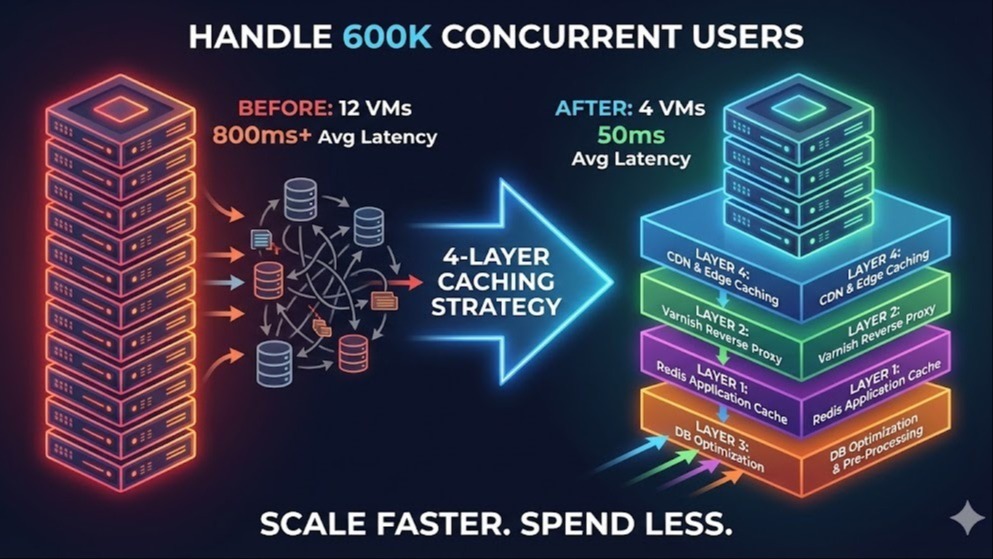
4. Caching is Cheaper than Computing
Every time your server has to calculate a report or fetch complex user data, it costs CPU cycles. Run the same calculation a thousand times per hour and you're burning through expensive compute capacity.
The Fix: Implement a caching layer (Redis).
The Savings: Serving data from RAM is virtually free compared to computing it from scratch. A high cache-hit ratio means your application servers can "coast," allowing you to use fewer, smaller instances in your auto-scaling group. Combined with the other fixes, this often enables a 40-60% reduction in application server count.
The Business Reality
In a competitive market like Dubai, margins matter. Engineering isn't just about building features — it's about building efficient systems.
A Junior Developer asks: "Does the code work?"
A Technical Lead asks: "Does the code work profitably?"
If your AWS bill is spiraling, the answer might not be finance — it might be architecture.
The Compound Effect
When you apply all four fixes together, the results compound dramatically:
| Fix | Primary Saving |
|---|---|
| Offload blocking compute to serverless | Downsize application servers |
| Index optimization | Downsize database tier by 50% |
| Kill zombie environments | 70% reduction in non-prod costs |
| Caching layer | Reduce remaining server count by 40-60% |
| Combined | 40%+ overall cloud cost reduction |
The best part? None of these changes touch your product features. Your users see faster performance, not slower. Your engineering team works on the same codebase. But your CFO sees a dramatically healthier infrastructure bill.
Originally published on LinkedIn
Related reading
Backend slowing down as you grow?
Send me your stack and your traffic shape. I will tell you which of the four layers is actually your bottleneck — most teams optimise the wrong one and buy bigger servers instead.