Adding AI to Your Existing Product? Here's the Backend Infrastructure Nobody Talks About.
A product manager recently told me: "We added GPT to our platform in a hackathon over the weekend. It worked great. Then we tried to ship it to our 40,000 users and everything fell apart."
Adding an LLM to your product is not like adding a payment gateway. Language models are slow, expensive, unpredictable in response time, and fundamentally different from every other API your backend communicates with. If you're planning to add AI capabilities, here's what your backend team needs to prepare for.
Problem 1: Latency Is Not What You're Used To
Your typical REST API call takes 10-100 milliseconds. A call to a large language model takes 2-15 seconds. Sometimes longer.
If your backend is built on synchronous request-response patterns, a single AI call ties up a connection for the entire duration. Under load, your connection pool fills up, your event loop gets congested, and your entire backend starts slowing down.
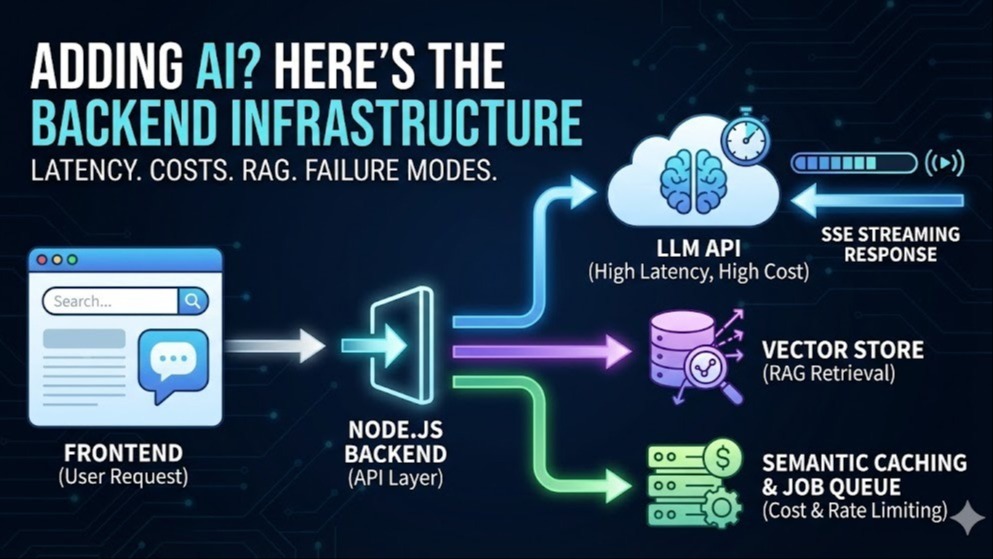
The solution: Streaming responses with Server-Sent Events (SSE).
Instead of waiting for the complete AI response, stream tokens to the frontend as they're generated — like ChatGPT's typing effect. The perceived latency drops dramatically. The user sees text appearing immediately instead of waiting 8 seconds.
Problem 2: Costs Escalate Faster Than You Think
40,000 monthly active users × 5 interactions/day × 30 days = 6 million API calls/month. At ~2,500 tokens per call, that's 15 billion tokens per month. Depending on the model, your monthly AI API cost could range from $5,000 to $50,000+.
The solution: Semantic caching.
Many AI interactions involve similar queries. Traditional caching (exact match) doesn't work well because users phrase questions differently. Semantic caching computes a vector embedding of the query and checks if a similar query has been answered recently.
Implementation: compute embedding → check vector store (pgvector, Pinecone) for similar query → if match above threshold (0.92-0.95), return cached response → else call LLM and cache result.
I've seen this reduce AI API costs by 40-55% in content-heavy applications.
Problem 3: Your Database Wasn't Designed for This
Most AI features require RAG (Retrieval-Augmented Generation). Before sending a prompt to the LLM, you retrieve relevant data from your database and include it in context. This requires vector similarity search — a completely different operation from your standard SQL queries.
Path A: Add vector capabilities to your existing database. PostgreSQL + pgvector extension. Simpler, but performance degrades beyond ~1-5 million vectors. Start here.
Path B: Dedicated vector store. Pinecone, Weaviate, Qdrant, Milvus. Faster at scale but introduces new infrastructure to manage. Move here only when you hit measurable limits.
Problem 4: Failure Modes Are Different
- Hallucination: The model generates confident, well-structured responses that are factually wrong. Build a validation layer for structured outputs.
- Timeout: Set aggressive timeouts (15-20 seconds) and implement graceful degradation — fall back to traditional search results if AI is unavailable.
- Rate limiting: Implement a queue (BullMQ) with priority levels for when concurrent requests approach provider limits.
- Cost spikes: Set hard budget caps. Implement token counting before sending requests — if a prompt exceeds your token budget, truncate context rather than sending an unexpectedly expensive call.
The Architecture
For an existing Node.js backend adding AI capabilities:
- API Layer: Existing Express/NestJS app with new SSE endpoints for AI interactions
- AI Gateway Service: Handles prompt construction, semantic caching, token counting, rate limit management, and fallback logic
- Vector Store: pgvector (if PostgreSQL) or MongoDB Atlas for RAG retrieval
- Job Queue: BullMQ backed by Redis for managing AI request queues and priority processing
- Monitoring: Track AI-specific metrics — token usage per user, cache hit rate, average latency, error rate, daily/monthly cost
Key principle: Treat the AI layer as a separate subsystem with its own error handling, caching, cost tracking, and fallback behavior.
Originally published on LinkedIn
Related reading
Adding AI to an existing product?
The model is the easy part. Send me what you are building and I will map the backend work it actually implies — retrieval, cost ceilings, latency budget, failure modes — before you commit a sprint to it.